NinjaTrader 8 · Futures · MES MNQ ES NQ
FemyRange Pro+ Futures Trader puts supply and demand zones, trend dots and the Globex levels on your chart, then lets you place and manage a bracket trade with one click.
Manual trading tool. Test in a simulated account first.
Stop losing precious time
Most of the day is setup and housekeeping. FemyRange Pro+ Futures Trader takes that off your plate so you can focus on the decision.
How it works
Zones, trend dots and Globex levels are drawn automatically on your 3-minute chart.
Set how much you are willing to risk. Contract size follows from it.
LONG, SHORT or a quick scalp sends a full bracket with stop and targets.
Move to break-even, exit, or hold a runner, all from the panel.
More than a panel
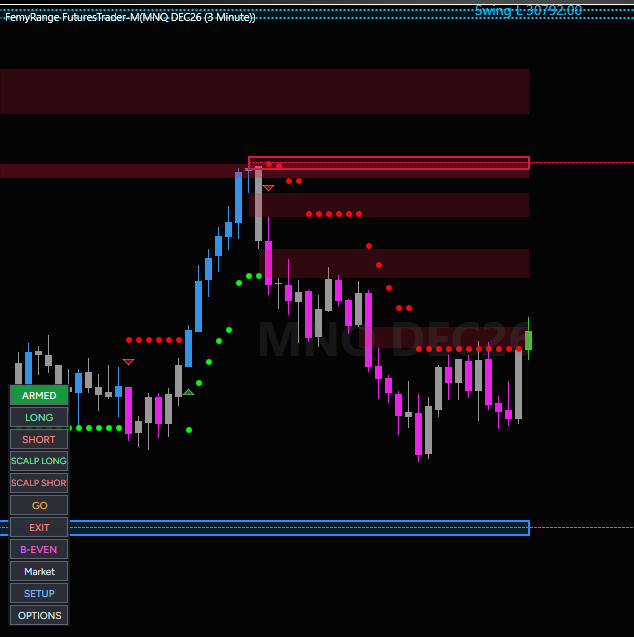
Supply and demand zones appear on your chart and update as the market moves.
A clear trail that shows which side is in control and when it flips.
The levels the market respects overnight, drawn as clean boxes you can read at a glance.
Enter long or short with stop and targets attached in one click.
Tell it your risk. It works out the contract size.
Protect the trade the moment it moves your way.
A faster entry for quick moves, with tighter defaults.
A live label shows whether the market looks trending or choppy.
Colours, sizes and what is shown are all adjustable.
A real MNQ 3-minute chart. Your colours and sizes are adjustable.
On your chart
Full checklist
Package
A monthly or annual subscription. Cancel any time. Updates included while you are subscribed.
Questions
No. FemyRange Pro+ Futures Trader is the manual edition. You choose the trade and click. The decision stays with you. For hands-free trading see FemyRange Pro+ Futures Automation.
Index futures on NinjaTrader 8: MES, MNQ, ES and NQ.
It is designed around a 3-minute chart.
Enter the e-mail you subscribed with in the licence settings. The tool checks your subscription in the background.
The tool stays active until the end of the period you have paid for, then the chart elements switch off.
A subscription covers one computer by default. Contact us if you need to move it.
See the refund policy at launch.
No. It is a software tool. Trading futures carries substantial risk. Always test in a simulated account first.
The FemyRange NinjaTrader package
Read the chart and trade it yourself, let it trade for you, and mirror it across your accounts.