NinjaTrader 8 · Futures · Hands-free
FemyRange Pro+ Futures Automation reads the same zones, trend dots and Globex levels as FemyRange Pro+ Futures Trader, then enters, manages and closes trades for you.
Automated trading can lose money. Prove it on a simulated account first.
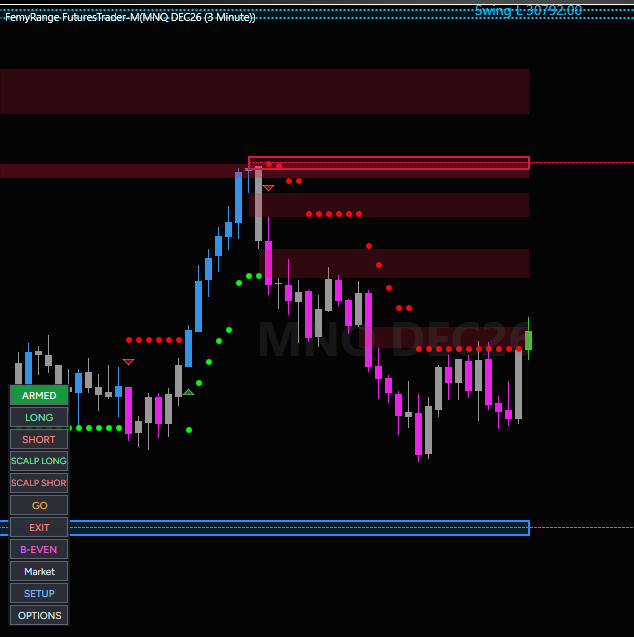
Let it do the watching
FemyRange Pro+ Futures Automation takes the entries and the management, and keeps to the limits you set.
How it works
Add it to a 3-minute chart of MES, MNQ, ES or NQ.
Choose risk per trade, daily loss limit and maximum stop.
One click turns on automatic trading for that chart.
It enters, manages and closes trades. You can pause or exit any time.
Hands-free
Arm it once. It reads the zones, dots and Globex levels and enters when its conditions are met.
Stop, targets and break-even are placed and moved for you.
The last part of the position is held for the larger move instead of being sold at the first target.
Takes setups at supply and demand zones and at the Globex levels.
Size follows the risk you set. It is smaller outside the main trading session.
Daily loss limit, maximum stop and one trade at a time per account.
Open trades are closed before the daily market break.
Switch it off or exit with one click and take over by hand.
Built to be proven on a simulated account before you ever trade it live.
Prop firm traders
Evaluations punish rule breaks: the daily loss limit, the drawdown, the oversized trade after a loss. FemyRange Pro+ Futures Automation trades by rules and keeps to the limits you set, so one bad moment does not end the account.
Entries and management follow the same rules every time, with no hesitating, chasing or revenge trades.
Set the daily loss limit, account floor, drawdown and maximum stop to match your firm. It checks them before it trades and stops itself at your limit, with one trade at a time per account.
Starting settings for common evaluation sizes, so you are not building the rules from scratch.
Stop fighting the rules and start trading inside them. Sign up today.
Join the waitlist todayNo tool can guarantee that you pass an evaluation or keep an account funded. Results vary. Many prop firms restrict or ban automated trading: check your firm's rules before you use it.
How it decides
Entries and exits are decisions, not a fixed schedule. It checks the market first and acts on what it finds.
It uses the efficiency ratio to tell a trending market from a choppy one, and factors that into its entries and exits through the day.
It looks at the quality of the price action behind a signal, such as how clean the move is and whether the trend agrees, before it commits.
Trend flips, pullbacks to the dots, zone and Globex-level rejections, opening range breakouts, trend continuation, fair value gap re-entries and more. Each has its own rules and checks.
It keeps a record of how each kind of signal has followed through, shows that record beside the entry, and can trade smaller on signals with a poor record.
It is rules-based software. It does not rewrite its own rules during the day, and no setup is guaranteed to work.
Know what it is doing
See how every trade did: by signal, by side, by hour of the day, by entry type and by market condition. Then decide what to keep and what to switch off.
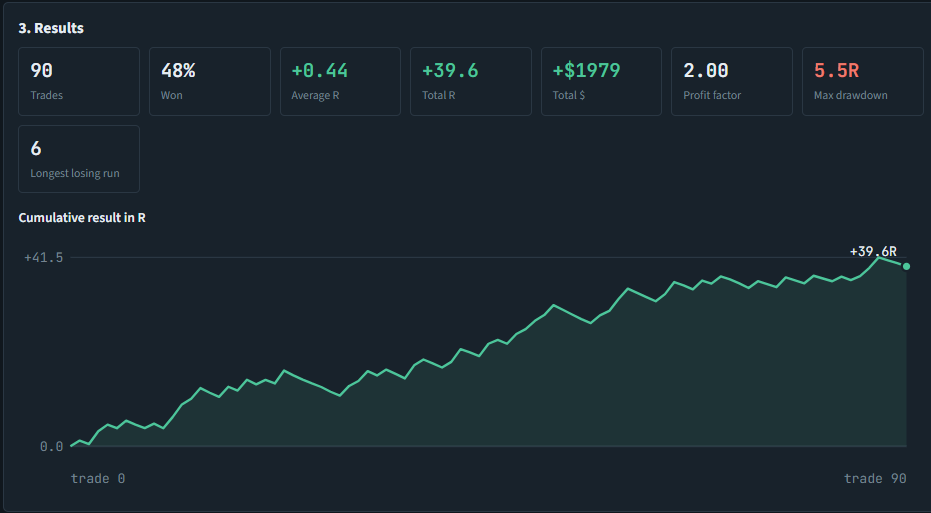
Example: results summary and the cumulative result in R.
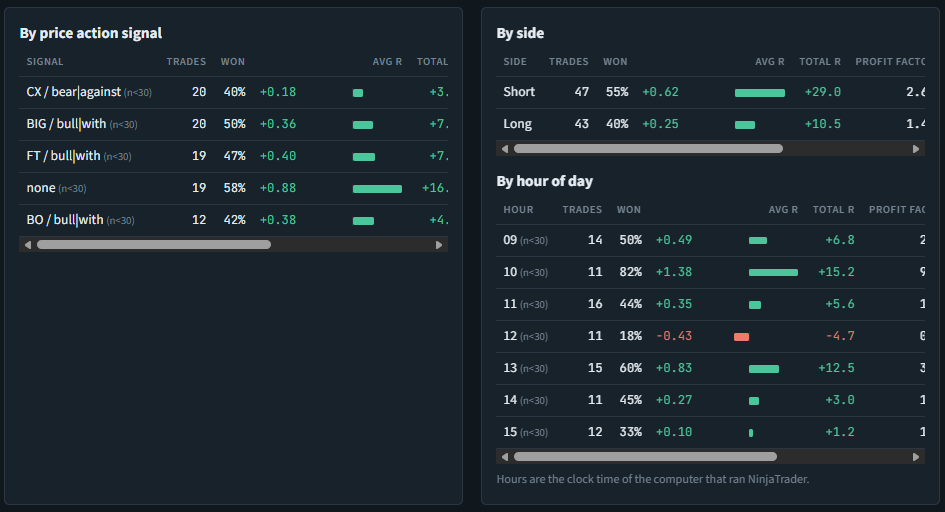
Example: by signal, side and hour of day.
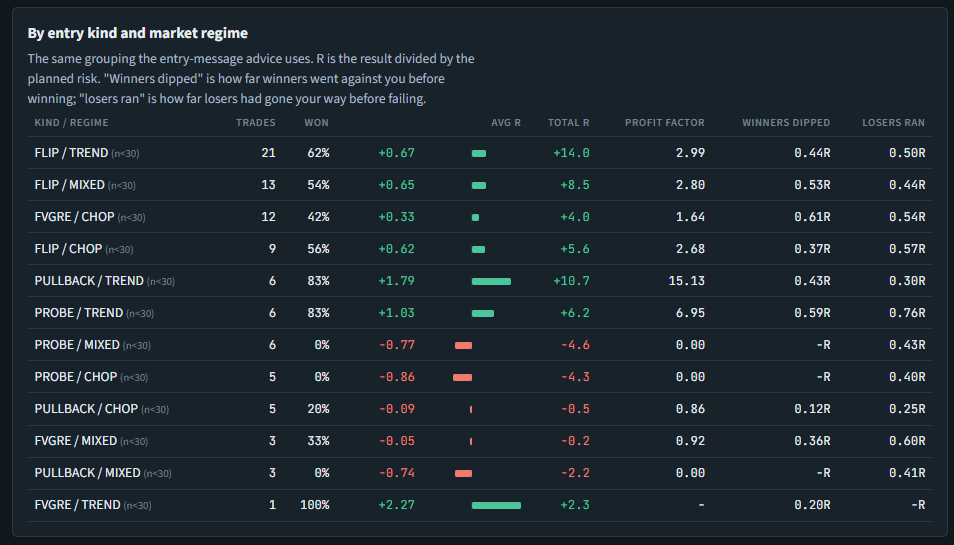
Example: by entry kind and market regime.
Full checklist
Package
A monthly or annual subscription. Cancel any time. Updates included while you are subscribed.
Questions
Once you ARM it, it can enter, manage and exit trades without clicks. NinjaTrader must stay running, connected and awake, and you should monitor it. You can pause or exit at any time.
Yes. Automated trading carries the same risk as any trading and can lose money quickly. It is not a promise of profit. Start on a simulated account.
It is rules-based software that reads market condition and trade quality, and it keeps a history of how its signals have followed through, which it can use to trade smaller on weak ones. It is not a black-box AI and it does not change its own rules while it trades.
Only if your firm allows automated trading. Many restrict or ban it, so read your firm's rules first. It has prop firm presets and limits, but it cannot guarantee that you pass or stay funded.
You can, but you should prove it on a simulated account first and only risk what you can afford to lose. Check your broker and any prop firm rules on automated trading.
A daily loss limit, a maximum stop size, the risk per trade and a trade limit. One trade at a time is held per account.
MES, MNQ, ES and NQ on NinjaTrader 8, on a 3-minute chart.
FemyRange Pro+ Futures Trader is manual: you click the trade. Automated adds hands-free entry and management.
Enter the e-mail you subscribed with in the licence settings.
No. It is a software tool.
The FemyRange NinjaTrader package
Read the chart and trade it yourself, let it trade for you, and mirror it across your accounts.